Open Source · Apache-2.0Linux / macOS / Windows No telemetry · No paid tier

Real benchmarks insideLinux · macOS · Windows · CLI + GUI · Open Source

File transfers
at full speed.

fast-copy is a Python CLI that squeezes every MB/s out of your hardware — block-order I/O, SSH tar-pipe streaming, content-aware deduplication, and sparse-file awareness. An honest, faster alternative to rsync and cp. 3–5× faster than scp / rsync / SFTP for remote transfers.

100% FREE · NO TELEMETRY · APACHE-2.0

2.5×faster than cp -ar · Linux, 12,347 files
LIVE  //  BLOCK-STREAMDUPLICATES DIVERTED AT GATE — 0 BYTES REWRITTEN
SRC
DST

Animated diagram: data blocks stream from the source drive to the destination drive; duplicate blocks are diverted at the xxHash-128 gate onto a reflink rail and are never rewritten, at 0 extra bytes.

THROUGHPUT
2,082 files/s
READ ORDER
PHYSICAL (FIEMAP)
POST-COPY VERIFY
xxh128

Latest releasev3.12.6 · July 2026

What's new

Bug fixes and rock-solid Windows behaviour in the latest builds.

Latest v3.12.6

  • Linux GUI crash fixed — the desktop app no longer segfaults on the first key press on some distributions (a bundled keymap-library mismatch; the GUI now always uses the system's matched pair).
  • Runs on more distros — Linux binaries are built against glibc 2.35, so they start on RHEL/Rocky/AlmaLinux 9, Debian 12 and other older-glibc systems.
  • Windows ACL support, guaranteed — every release now verifies NTFS owner/ACL preservation inside the shipped .exe, so it can never silently regress.

Also new Since v3.7

  • Faithful metadata preservation — permissions, directory modes & timestamps, and POSIX ACLs copied exactly on every path, matching cp -a — with up to 3.5× faster --preserve acl.
  • SMB / UNC network shares — copy straight to \\server\share, with encrypted saved credentials.
  • Whole-drive dedup (--index-existing) — hash a destination drive once, then reflink new copies against everything already on it.
  • ReFS block cloning on Windows — copy-on-write clones for instant same-volume copies, alongside a cross-platform desktop GUI with update checks.

Where the speed comes from

Every feature in fast-copy exists because it moves bits faster or wastes fewer of them. No phone-home. No surprises.

01

Block-Order I/O

Uses FIEMAP on Linux, fcntl on macOS, and FSCTL on Windows to sort files by physical disk offset before reading — eliminating random-seek overhead and maximising sequential throughput.

02

Content Dedup

Files are fingerprinted with xxHash-128 — the fastest non-cryptographic hash available — before writing. Identical content is skipped, saving bandwidth and write cycles.

03

SSH Tar-Pipe Streaming

Remote transfers bypass SFTP entirely: fast-copy pipes a tar stream over ssh + tar for a true single-hop transfer — nothing to install on the far side, zero temp bytes on either end. Works on Synology & busybox NAS.

04

Reflink-Based Copy

On btrfs / XFS / APFS / bcachefs, files are cloned via FICLONE / clonefile(2) — metadata-only CoW. A 10 GB copy on the same volume completes in milliseconds.

05

Sparse-File Aware

VM disks and Longhorn replicas are auto-detected via SEEK_DATA / SEEK_HOLE. Holes never hit the wire or the disk — 2.3 TB logical → 12 GB on disk on real backups.

06

Sudo + Audit Log

--use-sudo re-execs for root-only paths, then writes a hidden chattr +i JSONL audit log of every elevated run. Even root can't quietly delete a record.

07

Small-File Bundling

Instead of thousands of individual write calls, small files are bundled into a tar stream and block-written in one pass, then extracted locally. 10,000 tiny files move as fast as one big one.

08

Post-Copy Verification

After every transfer, fast-copy re-hashes the destination and compares against the source manifest. Corrupt or incomplete copies are reported before you delete the source.

09

Pre-Flight Space Check

Before writing a single byte, fast-copy computes exactly how much unique data will land — after dedup and sparse holes — and verifies the target has room. Jobs never fail halfway through a 500 GB copy.

10

Cross-Platform

First-class Linux, macOS and Windows support — as a CLI and a cross-platform desktop GUI. PyInstaller standalone binaries on every release; no Python runtime required on the target.

+

Also included

Cloud S3 / Azure / GCS + SMB targets · encrypted AES-256-GCM credentials · a cross-run hash cache (2nd backup is much faster) · and a desktop GUI for Windows, macOS & Linux.

Never miss a benchmark.

fast-copy now ships cloud copy (S3 / Azure / GCS), encrypted credentials and a cross-platform desktop GUI. Get new benchmarks & release notes — no spam, unsubscribe anytime.

What should I ping you about?

ONE EMAIL PER RELEASE · NO MARKETING LISTS · UNSUBSCRIBE ANYTIME

See it in action

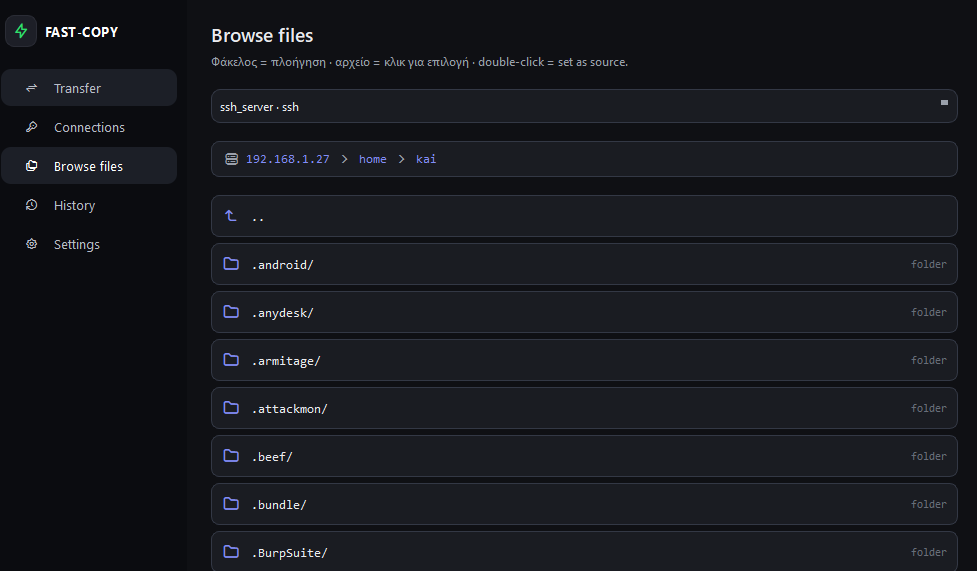
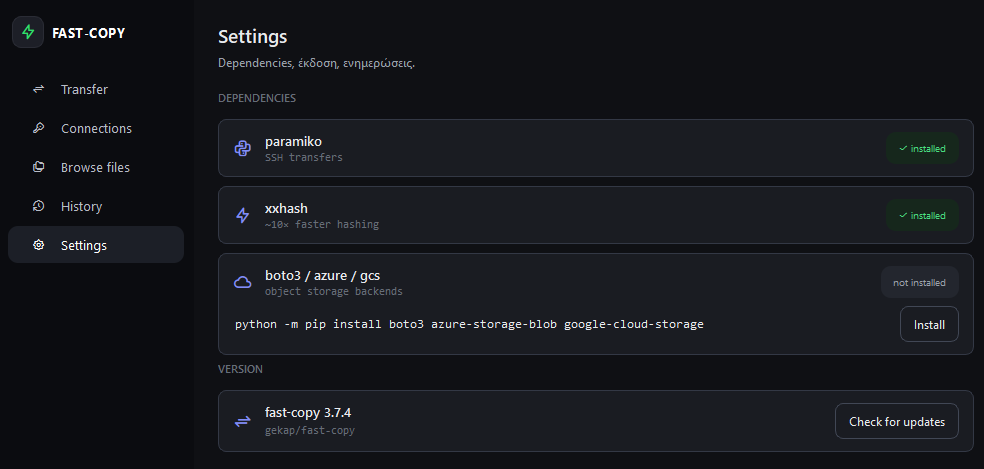
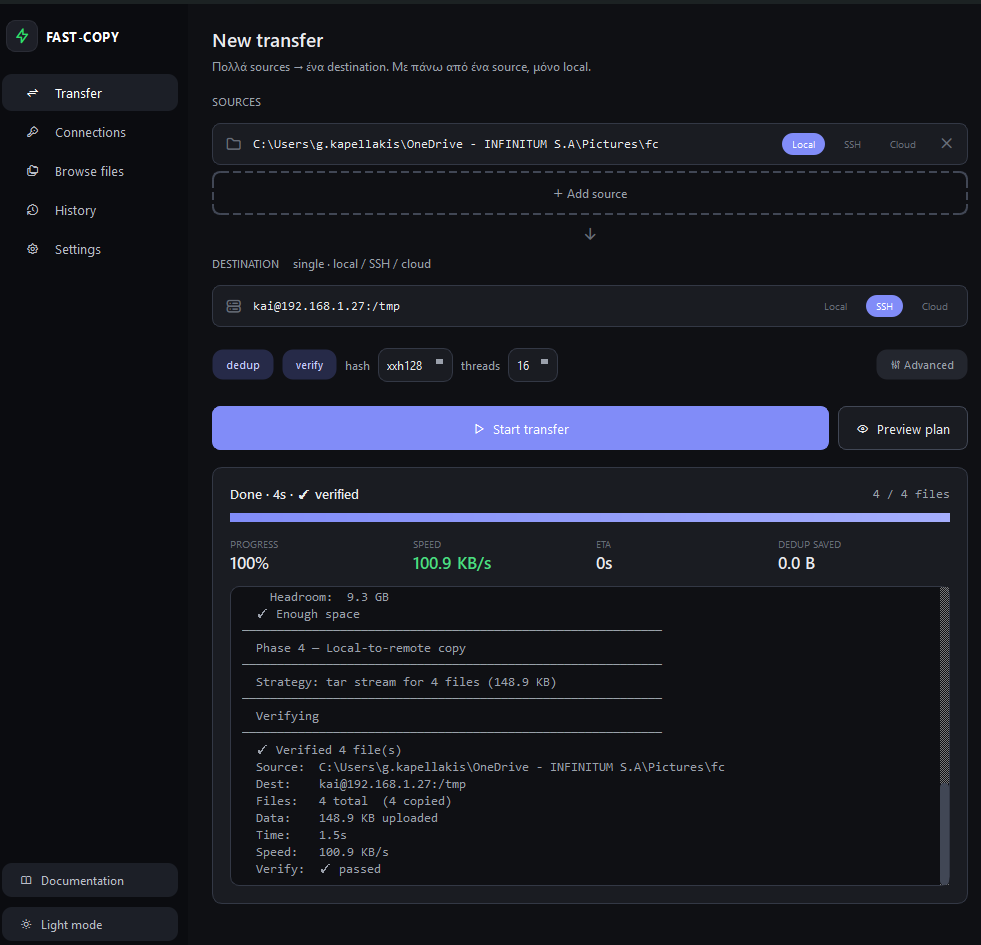
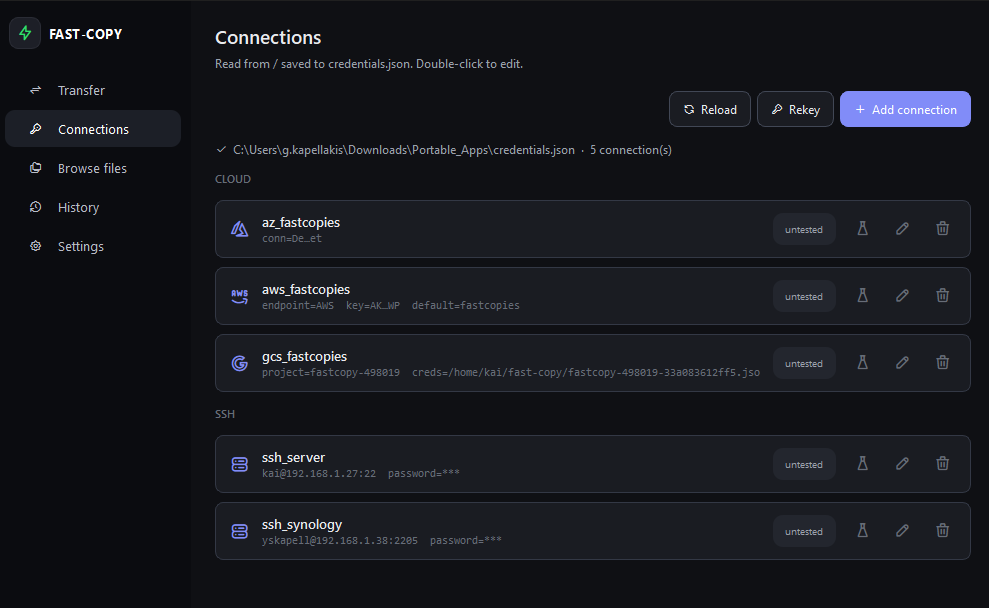
The same engine, now with a cross-platform desktop app — compose transfers, manage encrypted connections, browse local, SSH and cloud storage, and manage dependencies & updates.

fast-copy vs the alternatives

A feature-level comparison with the tools you're probably already using.

Featurefast-copyrsynccp (Unix)robocopy (Win)TeraCopy (Win)scp / SFTP
Block-order I/O (physical offset sort)
Content deduplication (xxHash-128)checksum only
SSH tar pipe (single hop)
Cloud storage (S3 / Azure / GCS)
Zero temp files on remote transferpartial
Reflink / CoW clones (btrfs/XFS/APFS)
Sparse-file awareness (SEEK_DATA)partial
Tamper-resistant audit log under sudo
Post-copy hash verification--checksumoptional
Pre-flight space check (before writing)
Small-file bundling
Standalone binary (no runtime needed)system pkgsystem pkginstallersystem pkg
Platform supportLinux/macOS/WinLinux/macOSLinux/macOSWindows onlyWindows onlyLinux/macOS/Win

How a copy actually runs

fast-copy runs a pipeline optimised for maximum I/O efficiency on every transfer — scan in disk order, fingerprint as it streams, decide, then verify.

01 // SCAN

Walk in disk order

The source tree is walked in physical extent order, not alphabetical — so the disk head only ever moves forward. A pre-flight space check refuses a copy that can't finish.

02 // HASH

Fingerprint as it streams

Every file is fingerprinted with xxHash-128 while it’s being read — no separate pass — and cross-referenced against the destination manifest.

03 // DECIDE

Seen this content before?

Match found → a reflink or hardlink is written, zero new bytes. No match → the file is written once, in block-sorted order, small files bundled.

04 // VERIFY

Confirm & log

Post-copy verification runs by default — the destination is re-hashed and diffed against the source — plus a tamper-resistant sudo audit log for elevated runs.

Install in seconds

Run directly with Python 3.8+, or grab a standalone binary from GitHub Releases — no runtime required on the target machine.

🐍 Python (all platforms)
# requires Python 3.8+
python fast_copy.py <source> <destination>

# SSH support
pip install paramiko

# Optional: ~10x faster hashing
pip install xxhash

# Cloud copy (S3 / Azure / GCS)
pip install boto3 azure-storage-blob google-cloud-storage

# Encrypted credentials
pip install cryptography

# Desktop GUI
pip install PySide6
📦 Download binary

Detected:

💻Your platform

Windows may show a SmartScreen warning — the binaries are open source but not yet code-signed (choose “More info → Run anyway”). Only download from the official GitHub release, where every build is published.

Other platforms & checksums
WindowsCLIGUI
macOS (Apple Silicon)CLIGUI
macOS (Intel)CLIGUI
LinuxCLIGUI
Python sourcefast_copy.py

Questions, answered

The things people usually want to know before trying fast-copy.

How much faster is it than scp, rsync or SFTP?

For remote transfers, typically 3–5× faster than scp/rsync/SFTP. SFTP often tops out at 1–2 MB/s because of its chunked protocol; fast-copy streams a raw SSH tar pipe instead. Locally, the win comes from reading files in physical disk order and skipping duplicate and sparse data — on the same volume with a reflink-capable filesystem, copies can finish in milliseconds.

Do I have to install it on both machines for SSH transfers?

No. fast-copy runs on your side and drives the remote over a normal SSH connection using the tar and ssh that are already there — no daemon, agent, or matching install required on the remote. It even works against busybox-based systems like Synology NAS.

Will it ever modify or delete my source files?

No. The source is only ever read. fast-copy never writes to, renames, or deletes anything in the source tree — it builds the copy at the destination and verifies it.

Do I need Python installed?

Not necessarily. You can grab the standalone binary from the releases page (no runtime needed), or run it as python fast_copy.py if you already have Python 3. Both behave identically.

What does deduplication actually do to my files?

Identical files are stored once and the duplicates become reflinks (copy-on-write clones) or hard links on filesystems that support them — the files still appear normally, they just share underlying data. On link-incapable drives like FAT32 or exFAT, nothing is linked; fast-copy simply reports the bandwidth it saved by not re-reading the duplicate.

Is it safe to run under sudo?

Yes. The --use-sudo flow is security-hardened: it uses O_NOFOLLOW to resist symlink attacks, runs a script-permission preflight, refuses self-update while elevated, and writes a tamper-resistant (chattr +i) JSONL audit log recording who copied what.

Which platforms are supported?

Linux, macOS and Windows — each with native I/O optimizations (FIEMAP on Linux, fcntl on macOS, FSCTL on Windows). Windows long paths over 260 characters are handled too.

Does it phone home or collect any data?

No. There is no telemetry, no analytics, and no network calls beyond the SSH connection you explicitly ask for. It's open source under Apache 2.0 — you can read every line.

Do I have to pay to use fast-copy?

No. fast-copy is completely free and open source under the Apache 2.0 license. There's no paid tier, no license fee, and nothing locked behind a paywall — every feature you see is the whole tool.
Stop waiting on cp.

100% FREE · NO TELEMETRY · APACHE-2.0 · SINGLE BINARY

Detected platform — also macOS & Windows